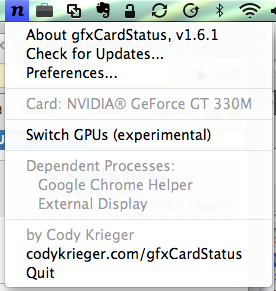
I purchased one of the new MacBook Pro’s that were released in April, and I’ve been really liking it. Mostly it just offers improvements to some things that were getting annoying about my old one. It has more memory, a higher resolution display, and the unibody case is cool. In any case, the battery life is nowhere even close to the 8-9 hours they advertise. As a result, I was curious about how often it was using the high powered discrete NVidia graphics chip, so I started looking with system profiler, and it was pretty much always running. With some experimenting, I found out it was mostly because of Google Chrome. It would be cool if Apple released some tools to fine tune the graphics switching, and I imagine they eventually will, but for now there is this cool program, gfxCardStatus, which has really advanced quickly since it was released. One thing that is really cool now is that it shows a list of programs that are causing the system to use the high powered chip.
Monthly Archives: May 2010
Cisco AnyConnect with Ubuntu server
Cisco has a VPN client called AnyConnect which is used with its SSL VPN products. I don’t know that much about the details of their product line, but I happened to be attempting to use it in a weird situation and ran into some trouble. I’m running an Ubuntu server AMI on Amazon EC2, so it’s a quite minimal install. It seems that pretty much every error with the program comes up as the following:
>> error: Connection attempt has failed due to server certificate problem.
In my case, there were several issues. First of all, it requires several shared libraries. If you run the following, it should take care of all of the shared library requirements missing in the default install:
$ sudo apt-get install libnss3-1d
Next, it actually expects Firefox to be installed, because it apparently messes around with the firefox config store. I installed Firefox to no avail (which downloaded about 300 MB of packages), so I will save you the time and let you know that that was both unnecessary and useless to solve the problem. All you need is a Firefox profile for it to stick some new cert info in. This command (executed from the user’s home dir) should do the trick:
$ mkdir -p .mozilla/firefox/anything.default
And one more thing to mention, various forum posts I saw mentioned not to run the “vpn” program (used to manage the VPN state) as root. So, I ran it as my normal user.
Once I did all of that, everything worked great. Cool.
