Category Archives: nerd

A recipe for trouble

Dear the Internet,

Please never write this code:

if (value == null || value.equals(“”)) {
d = new Date(0);
} else {

This is what I like to call “bug hiding”. Rarely does a person really mean 12/31/1969 when they pass you a null or blank value. That is all.

JSP is still really bad

I had to do some maintenance work recently on a JSP app. Normally, I avoid JSP like the plague because my (dated) experience with it has been mostly bad. The app I had to maintain was a stone age thing full of scriptlets, but I did a little research and used JSTL to do some of the work on the updates. I was pretty impressed with how cleanly you can do some flow control stuff now. So, I started some new development on a new project with JSP as a proof of concept to see if it is a tolerable programming environment now. It isn’t. For the real basics, there has been a lot of improvement, but some of the mechanisms for taglibs, dealing with variable between servlet/JSP, etc. are still very clunky. And today I encountered this. If you forget to put the return type when defining a function within your app, you get a super mysterious error.


I guess you could blame the implementation (Jasper), but what does anyone else use? Also, you can sort of tell from the screen shot of the editor, but the JSP editor in the current version of Eclipse is pretty awful. It displays some of your double quotes as single quotes, which is really awkward.

Tapestry 5 pain points

I have been doing Tapestry 5 work for about a year now, and I’m definitely still learning, but I think I know my way around fairly well. I really (mostly) like it, and I think it is way easier to use than Tapestry 4, as well as many other frameworks. It also results in a nice clean code base which isn’t too difficult to approach. There are, however, a couple of areas that I really just find confusing. Some of them aren’t too bad once you get to know them, but they are hard to learn. I think it is important for most aspects of the framework to be easy to learn/use, because if people encounter pain during their initial impression stage, they will abandon the framework and use something else.

The first issue I have is with the way that the Select component works when you want to have a dynamic model for the list. I think this is a common requirement for applications, so it is something people will most likely encounter fairly quickly. For complex models, it is usually necessary to implement two interfaces: SelectModel and ValueEncoder. The interfaces make sense once you get to know them, but I think the learning curve is quite steep for such a common task. I’m not sure how this could be solved, but it seems like Tapestry 4 may have had a more simple system (though I’m sure it had some problems which led to it being redone).

The second issue I have is with page context. Often times in standalone web applications, I have created pages which take query string parameters. These can be referenced by external apps or pages, and used to link between pages of an app. Tapestry’s equivalent is the page context, which can be used to pass contextual data between pages. There are two problems that I’ve encountered with page context. First, it is limited in what data it can represent. It is generally just a list of nameless parameters. This makes it difficult to pass only certain parameters or parameters with names. Second, the format for the URL is not a part of the spec (correct me if I’m wrong), so it can only reliably be used via other Tapestry pages. This makes it difficult to pass data in to a Tapestry page from an external place.

So to sum it up, I’d like to reiterate that I really do like Tapestry 5 and hope for its widespread adoption, but it has a few points that are difficult to deal with. If these issues were addressed in a future version, I think it would help ease a new developer’s adoption of the framework.
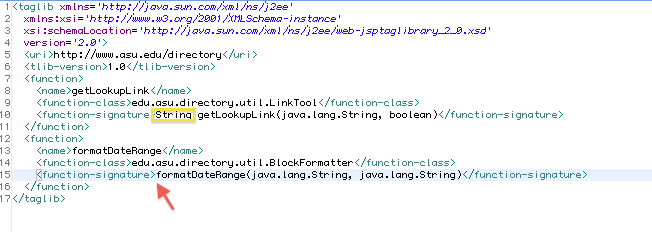
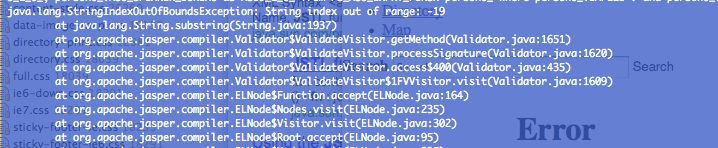
Image submit in Tapestry 5.1

This just took me a really long time to figure out, so I’m writing it down. Tapestry 5.1 adds support for submit buttons with an image (I think it was added in 5.1). In any case, you just use the normal tag, but you add an image attribute which is an “asset”. I added an Asset property to my page class and used @Inject and @Path to inject the asset. I used that property name in the image attribute, and it didn’t work. It turns out, you don’t need to declare the asset as a property in your page class. You just specify the path in the image attribute just like you would in the @Path annotation. So, it looks something like this:

<t:submit image=”context:images/submit.gif”/>

Much simpler than I was thinking. Sometimes I get really frustrated with these little Tapestry issues…

Tabs vs spaces in Netbeans


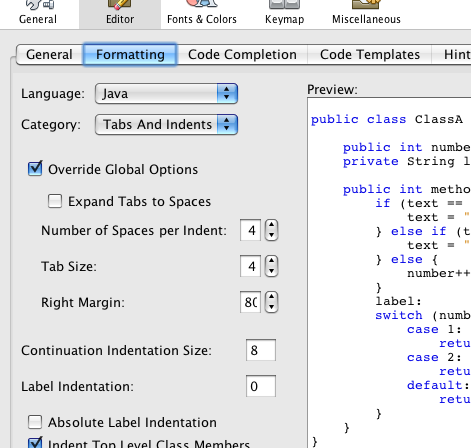
I work with some people that like spaces and some people that like tabs in their code. I don’t really care, so I try to follow whatever the project is using. I ran into a big problem with Netbeans, though, in that it seems like getting it to use tabs only is impossible. It turns out they appear to be following a weird part of the Java Code Conventions spec:

Four spaces should be used as the unit of indentation. The exact construction of the indentation (spaces vs. tabs) is unspecified. Tabs must be set exactly every 8 spaces (not 4).

http://java.sun.com/docs/codeconv/html/CodeConventions.doc3.html#262

So, Netbeans sort of has two different “numbers” around tabs. There is a number that says how many spaces a tab should appear as, and a number that says how many spaces should be used when you indent something. By default a tab appears as 8 spaces, but a level of indentation is 4 (like the spec says above). As a result, it inserts four hard spaces when you indent one level, and a tab if you indent two levels. The solution is to set the two numbers to the same value. Just a wee bit confusing for a new user.

Here’s a bug report where someone describes it:

http://www.netbeans.org/issues/show_bug.cgi?id=52053

Opera!

I got really sick of Firefox hogging all of the memory on my laptop (it has 4 gigs), and I thought it would be fun to drive my coworkers nuts by reporting bugs specific to an exotic browser, so I started checking them out the other day. I started with Amaya because I remember it being really crappy back in like ’98. Unfortunately it still is. So, I tried Opera and it is actually pretty nice. The interface is a little ugly, but it seems to be way faster than Firefox. It also has this cool speed dial thing that comes up whenever you open a new tab that shows you all of your favorite web sites, and it shows them as pictures, which I think is really cool. So far it is pretty much able to keep up with FF on ajaxy web sites, although I have noticed a few issues with facebook. It also works with this web site I use that has a complicated Java applet. Pretty cool.

Browsing old versions of a subversion repository

I was trying to look at the contents of an old file in subversion today that had long ago been deleted, with no luck. In the Eclipse plugin for CVS, they had a feature that would allow you to define a date, then browse the repository based on that date, but it seems to be missing from subversion.

I found a workaround, but it isn’t quite as nice. You can browse a specific revision of the entire subversion repository, then look at the file. All you have to do is go to this URL:

http://<host>/<repo>/!svn/bc/<revision>/

Where the base URL is the root of your repository, and the extra stuff after the ! specifies the revision. And don’t ask me what bc stands for, I have no idea.

As for finding out which revision to look at, that is a little tricky. It can be helpful to look at logs of other files and see which dates correspond to which revisions.

Tapestry 5: radio buttons coming back with value "on"

I ran into a problem today where I was setting the value of a radio button in Tapestry 5 to a long field within a property. I was getting back the value “on” and Tapestry was crashing trying to coerce it into a long type. It turns out the value was null, and the default value for a radio button is “on”. So, if you encounter this, make sure your value fields are not null.

Computer lingo

I often find myself staring down some technical thing and step back for a moment to interpret the words on my screen the way a normal person would. I think I might start blogging these anecdotes. Here’s the one I’m looking at right now:

Upgrading Confluence EAR-WAR Edition

To a normal person, an ear is a thing that you hear with and a war is a thing that involves guns and bombs. The concept of fighting a war with ears or having a war involving ears is pretty funny. Confluence is also a word that means something. Perhaps the ear war is taking place near the confluence of two rivers.

The end of Netbeans week


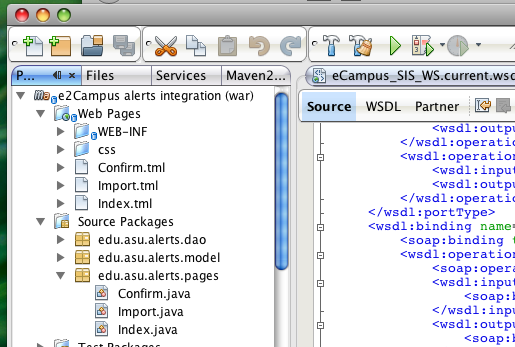
I have finished my week of Netbeans usage and so far am pretty impressed. I was able to go all week without using Eclipse once. A large part of that is thanks to the fact that I’ve been using Maven 2 for a large number of my most recent projects. If you have a pom.xml, Netbeans will be able to check out your project and open it without you doing a single bit of configuration. This is great, since it goes a long way in preventing IDE lock-in. If you are working on a Maven project, you can use Netbeans easily, even if everyone else is using Eclipse. I didn’t get very deep into working on non-Maven projects, so that may have been quite a bit more hassle. All in all, though, Netbeans has come a long way since the last time I gave it a serious test. Here are some of my favorite features:

  • Autocomplete seems quite a bit faster than Eclipse
  • Maven integration is good, but I only briefly tried projects with parent-child relationships, which seemed to trip it up a bit
  • Adding getters/setters is a lot less hassle than Eclipse.
  • Using jetty:run right inside Netbeans was pretty easy, though it did require the use of external Maven, I’m not sure why.
  • The web.xml editor is pretty cool
  • It has a built in SOAP client, although it seems pretty clunky.
  • SVN integration seems complete and not very buggy. The interfaces are quick and simple, though I might say it’s a bit oversimplified from the way Eclipse does things.
  • The built in editor support for non-Java files seems less buggy than in Eclipse.

I may give Netbeans another week. It should be pretty obvious to anyone that it takes longer than a week to fully get a feel for such a complicated piece of software.